 中文 (中国)
  Français
 English
 Deutsch
 Español
 Italiano
 Nederlands
 Português
 Русский
 日本語
日本語
Products: STREAM 100 ; STREAM 200 XLR
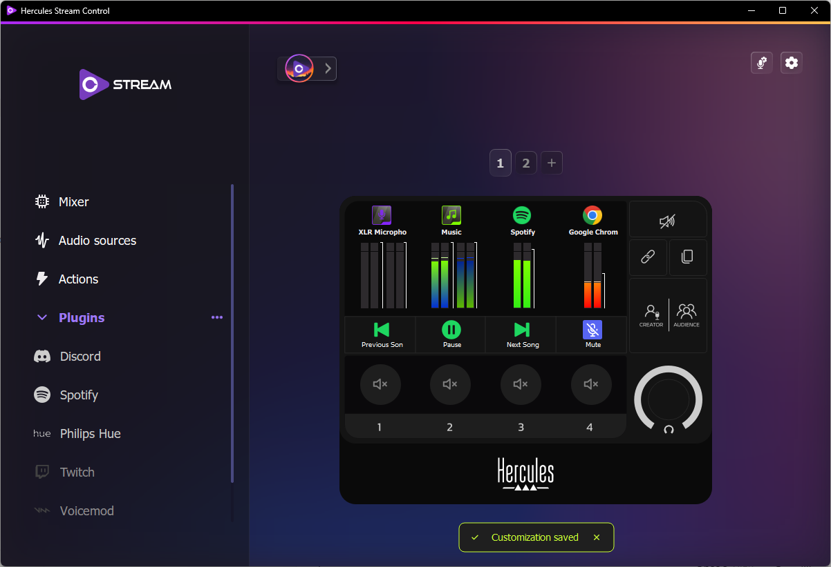
Hercules Stream Control software - Release Notes
Release 2.5 (09/16/2026)
Refreshed app design:
The overall look and feel has been modernized to better match the Stream range visual identity.
New Philips Hue plugin:
Turn lights on/off, set color, brightness and temperature, apply a scenario, start and configure a color loop.
New audio features:
“App Loop” VU meter: cycle through several apps on a single VU meter.
“Foreground App”: instantly adjust the volume of the focused app.
New actions:
“Launch File”: open a file or launch an app.
“Mixer Cross Fader” (S200XLR only): change several soundcard volumes in a single click.
Profile:
Audio levels saved per profile, duplicate profile.
Release 2.4 (05/07/2026)
Improved Streamlabs plugin:
New action and updated UI.
New “Switch Profile” action.
Compatibility with SteelSeries Sonar.
General user interface improvements.
Improved first-user experience with a new “Help” section (hotfix planned in the coming weeks on the S100 Firmware Updater).
Major code refactoring to improve feature integration and maintainability.
Migration to a newer version of Qt.
Various bug fixes.
Version 2.3 (01/2026)
New Twitch plugin
Create clip
Create stream marker
Play ad
Shield mode
Chat management (sub only, follow only, emote only, slow chat, clear chat)
Send message
Send announcement
Viewer count
OBS Plugin improvements
Display or hide groups and sources
Change OBS profile
Change OBS scene collection
Global UI / UX improvements
Stream 200 – Inputs volumes
You can now adjust the volume of these specific input
Creator
Audience
Aux
Microphone
Line in
New native action
« Go to page » : allow you to target a specific page without using next or previous page action
Release notes
Starting with Stream Control v2.3, new updates will be highlighted when the software is launched.
All changes will be clearly explained in stylized release notes.
Version 2.2.9 (10/2025)
New Discord plug-in !
Control your own input / output volumes
Set any channel member on a track and manage its volume live
Long press your knob to quickly assign a specific channel member on your track
Mute / deafen yourself and others
And other useful actions while playing with your mates
New Spotify plug-in !
Play/Pause/Next/Previous and mute songs
Activate shuffle and repeat modes
Like a song and add it to your playlist
Start any of your playlist
Stream 200 XLR major improvements !
New XLR Microphone settings menu with improved effects and graphical EQ
Apps and peripherals can now be drag-and-dropped directly in the device and controlled as with Stream 100.
Bunch of UI/UX improvements !
New Plug-In menu interface
New Plug-In setting menu and tutorial
New action tooltips added
Improved profile menu
Up to 8 pages
20/03/2025 - STREAM CONTROL V2.1
User Interface improvements
Audio Source and Action names automatically displayed when drag-and-dropped
Plug-Ins menu with new download and add button for each Plug-In
Consistency between all tooltips
Gradiant vumeter colors by default
New Voicemod integration
2 new actions : Voice Changer ON/OFF and Hear Myself ON/OFF
Name lists added to Add Voices and Add Soundboards menus
Improved reaction time when effect is triggered
New USB Microphone menu
Microphone selection
Monitoring volume slider
XLR Microphone menu add-ons
Mic type always saved and not depending on presets anymore
Gain always saved and not depending on presets anymore
New Mic Meter and Voice Monitoring to help set Gain Level
2 presets for Hercules HXD-700 microphone
1 No FX preset
Bug fixes
Action : Set Level volume
Voicemod : 2 voices playing at the same time
Tutorial : Watch again failing
Stream 200 XLR : Display active mode not restored
Ram Overloading
STREAM CONTROL V2.0 (02/12/2024)
First Time Use
Language detection
New tutorial videos
Main Input/Output selection step
Default configuration
User experience and interface
Audio sources & Mixer menus
Action menu sorted by type
New Plug-Ins menu
Audio sources configuration banner
Audio sources tags
Direct drag-and-drop from audio sources list
Stream 200 XLR : Audio source assignation without Windows Mixer
Bug fixes
Multiapp grey icon
Background selection
Missing translations
Version 1.4.5 (10/2024)
New features
Profile management : Auto Save, Create new empty profile
Bug fixes
Voicemod connection
Version 1.4.1 (09/2024)
New features
Profile management : Create, Save, Edit, Delete
Voicemod integration : Voicebox, Soundboard
Delete page
New graphic interfaces
New design for XLR Microphone settings
New design for General Settings
New design for Customization Settings
New icon library
Bug fixes
Action Name - Number of caracters
Vumeters Style - Wrong order
Crash Mute Channel
Version 1.3.4 (04/2024)
Fix
New apps crash
Version 1.3.2 (04/2024)
Fixes
Vumeter color selection
Icon color in volume tag
New features
New languages : German, Dutch, Korean
XLR Mic settings menu graphical user interface improvement (Stream 200 XLR)
Microphone limiter added (Stream 200 XLR)
Version 1.3.0 (01/2024)
Stream 100
App: Multi App bug fix
Screen: Volume bar now displays in red when a source is muted
Screen: Improved graphics resolution
Stream 200 XLR
Action: Mute Source bug fix
Mic presets should save/load/reload as expected.
Mic DSP Improvements
General
Firmware updates have been improved.
Some UI in settings has been improved.
Version 1.2.7 (01/2024)
Stream 100
Action: Mute Source bug fix
Stream 200 XLR
Action: Mute Source bug fix
General
Imported icons are now correctly saved.
Version 1.1.0 (12/2023)
First Release